Unknown
Represents nodes that are not installed in your Node-RED instance.
Where and why do we see the Unknown node?
The Unknown node appears automatically when you import flows containing nodes that aren't installed in your current Node-RED instance. You cannot add Unknown nodes manually - they only appear as placeholders for missing node types. This helps you identify which node packages need to be installed before your imported flows can function properly.
How the node appears
When Node-RED encounters an unrecognized node type during import, it creates an Unknown node placeholder that preserves the original configuration and connections. Once you install the missing package and reload Node-RED, Unknown nodes automatically convert to their proper types with all settings intact.
Latest versions of Node-RED include package dependency information when exporting flows. When you import these flows, Node-RED automatically detects missing packages and prompts you to install them with a single click, eliminating the need to manually identify and install each required package.
Identifying required packages
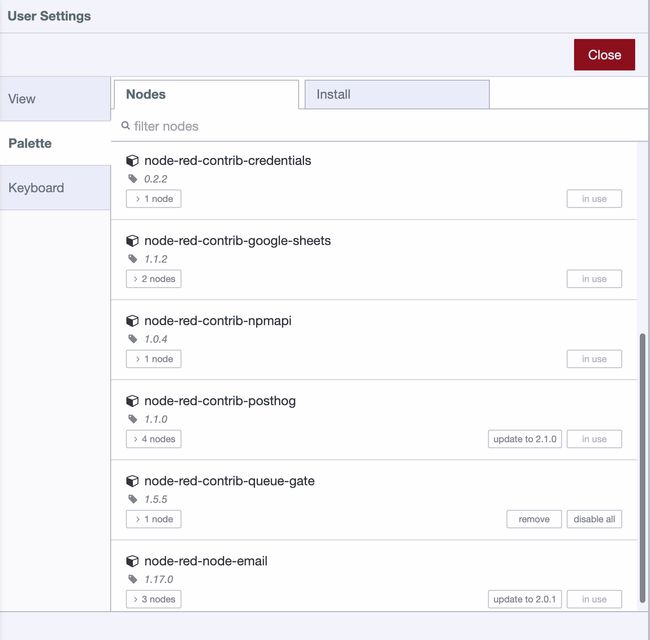
Before importing flows, identify which node packages are installed in your source instance to prepare the target instance with necessary dependencies.
Using the Palette Manager
Access the Palette Manager through the Node-RED menu to see all installed packages and their versions.
Using System Info

The System Info dialog provides a comprehensive list of installed node packages that you can view and copy for documentation.
Migrating flows to FlowFuse
When migrating flows to FlowFuse, use the nr-tools plugin for automatic package installation, credential migration, and complete flow transfer. This eliminates manual package identification and installation, making migration faster and less error-prone.
Node Documentation
This node is a type unknown to your installation of Node-RED.
Details
If you deploy with the node in this state, its configuration will be preserved, but the flow will not start until the missing type is installed.
Use the Menu - Manage Palette option to search for and install nodes, or npm install <module> to install, any missing modules and restart Node-RED and reimport the nodes.
It is possible this node type is already installed, but is missing a dependency. Check the Node-RED start-up log for any error messages associated with the missing node type.
Otherwise, you should contact the author of the flow to obtain a copy of the missing node type.