OPC UA Tutorial: Connect and Exchange Data with Industrial Equipment
A practical guide to accessing industrial data through OPC UA server gateways
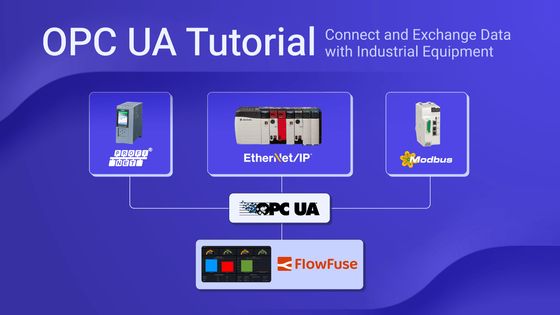
If you’ve ever tried to connect industrial equipment from different vendors, you know how frustrating it can be, a mess of incompatible protocols, proprietary software, and confusing drivers. Your Siemens PLC speaks one language, your Allen-Bradley controller another, and that Modbus sensor? Yet another protocol entirely.
OPC UA changes that.
OPC UA (Open Platform Communications Unified Architecture) is the industry-standard protocol that eliminates this chaos. Also known as OPC Unified Architecture or IEC 62541, it provides a universal language for secure communication between PLCs, SCADA systems, HMIs, and enterprise applications ,regardless of the manufacturer.
This hands-on guide walks you through building your first OPC UA integration using Node-RED and FlowFuse:
- Connect to any OPC UA server—Kepware, MatrikonOPC, or built-in PLC servers
- Browse available tags and discover Node IDs from your equipment
- Read real-time values from PLCs, sensors, and industrial devices
- Write control signals and setpoints back to your systems
Why OPC UA?
If you have worked with industrial equipment, you know the pain. Every PLC vendor uses a different protocol. Your Siemens S7-1500 requires TIA Portal and PROFINET drivers. The Allen-Bradley ControlLogix needs RSLinx and EtherNet/IP. A Modbus temperature sensor needs yet another tool. Before long, you are juggling a dozen different software packages—each with its own licensing, training, and maintenance overhead.
Breaking the Cycle
OPC UA eliminates this fragmentation. Instead of relying on vendor-specific protocols, it provides a universal language for all your equipment. Here is why it is becoming the industry standard:
Universal Connectivity
Connect to any modern PLC using a single protocol. Leading manufacturers like Siemens, Rockwell, Schneider, and ABB now embed OPC UA servers directly into their controllers. One client, all your equipment.
Information, Not Just Data
Reading a temperature value from OPC UA does not just give you "42.5"—it gives the full context: 42.5 °C, measured at 14:32:15.625 with "Good" quality, from "Tank_01/Temperature", and includes alarm limits (10 °C / 80 °C). This context reduces guesswork and helps prevent costly mistakes.
Security Built for Industry
While protocols like Modbus transmit everything in plain text, OPC UA uses enterprise-grade security. It supports X.509 certificates, 256-bit encryption, and robust user authentication to safeguard critical infrastructure from cyber threats.
Future-Proof Investment
OPC UA is the foundation of Industry 4.0 initiatives around the world. It is not just another protocol—it is the one major vendors are standardizing on. Choosing OPC UA today ensures long-term compatibility and ROI.
Getting Started
Now that you understand why OPC UA is widely adopted, let’s explore how to implement it using FlowFuse Node-RED.
This next section walks you through exactly what you need to get started with a working setup, whether for prototyping or production.
What You’ll Need
Before diving into the flow-building process, make sure you have the following:
- An OPC UA server (like Kepware, MatrikonOPC, or built into your PLC)
- A FlowFuse Node-RED instance running on your edge device.
For production OPC UA deployments, we recommend using FlowFuse. When connecting to industrial systems, you need more than just Node-RED—you need team collaboration so multiple engineers can work on flows safely, audit logs for compliance tracking, high availability to prevent downtime, and remote device management for edge deployments.
FlowFuse provides these enterprise features plus automatic backups, one-click rollbacks, environment variables for different sites, and DevOps pipelines for testing changes before they reach production.
Installing OPC UA Support in FlowFuse
To work with OPC UA in FlowFuse Node-RED, you will first need to install the required nodes.
Install the OPC UA Node Package
- Open the FlowFuse Node-RED editor.
- Click the menu in the top-right and choose Manage palette.
- Navigate to the Install tab and search for
node-red-contrib-opcua. - Click Install.
Once installed, you will find new nodes for OPC UA communication in your palette, including Client, Item, and Browser and other OPC UA nodes.
Connecting to Your OPC UA Server
To begin accessing industrial data, create a client connection using the OPC UA Client node.
- Drag an OPC UA Client node onto the canvas.
- Double-click to configure it.
- Click the + icon to create a new endpoint configuration.
- Enter your OPC UA server address, for example:
opc.tcp://192.168.0.10:4840 - Set the security mode to None (you can add security later).
Security Note: This tutorial uses "None" for the security setting to keep things simple. In production environments, always use appropriate security—typically "Sign & Encrypt" with certificates.
- Click Add, then Done.
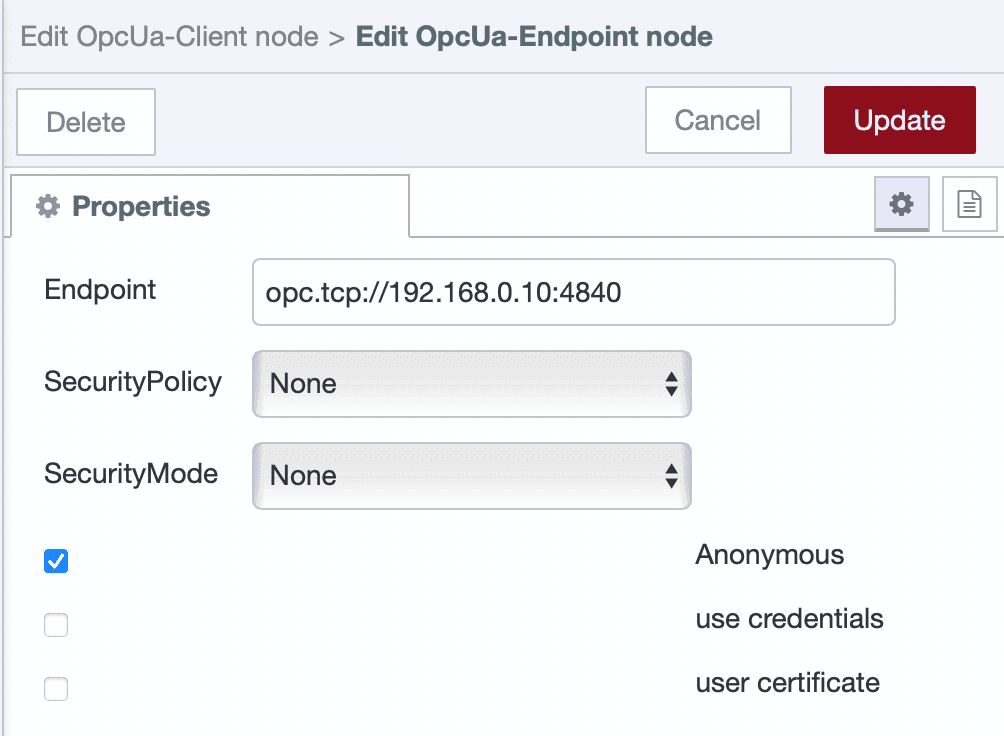
With the connection now defined, you’re ready to explore what tags are available.
Browsing Tags (Optional)
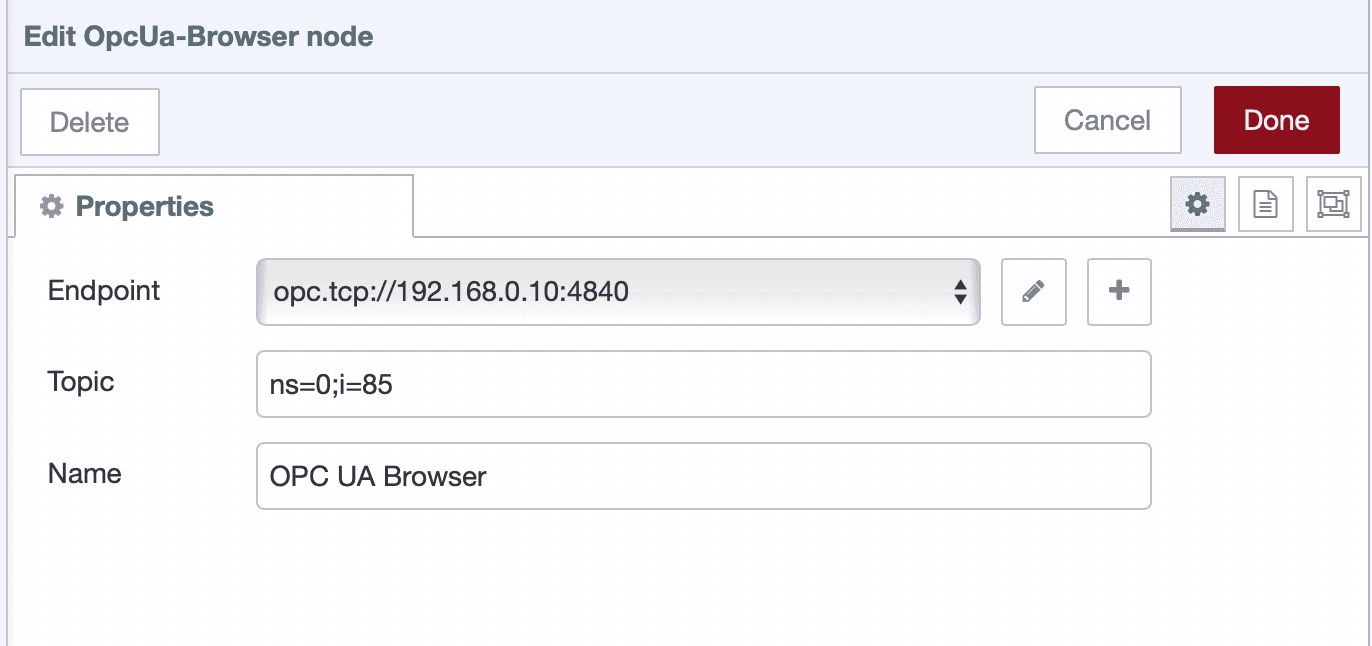
If you do not already know the Node IDs of the tags you want to access, use the OPC UA Browser node to explore the tag structure.
- Drag an Inject, OPC UA Browser, and Debug node onto the canvas.
- Connect the output of the Inject node to the input of the Browser node, then connect the Browser's output to the Debug node.
- In the Browser node, set the topic to
ns=0;i=85(the root Objects folder). - Configure the Inject node to send a timestamp.
- Deploy the flow and click the Inject node.
Tag information will be printed to the debug sidebar. You can now identify the exact Node IDs to use in your reads or writes.
Reading Tag Values
Once you know the Node IDs, you can start reading data from your industrial equipment through the OPC UA server.
Reading a Single Tag
Here’s how to read a single value in real time:
-
Drag an Inject node onto the canvas (this will trigger the read operation).
-
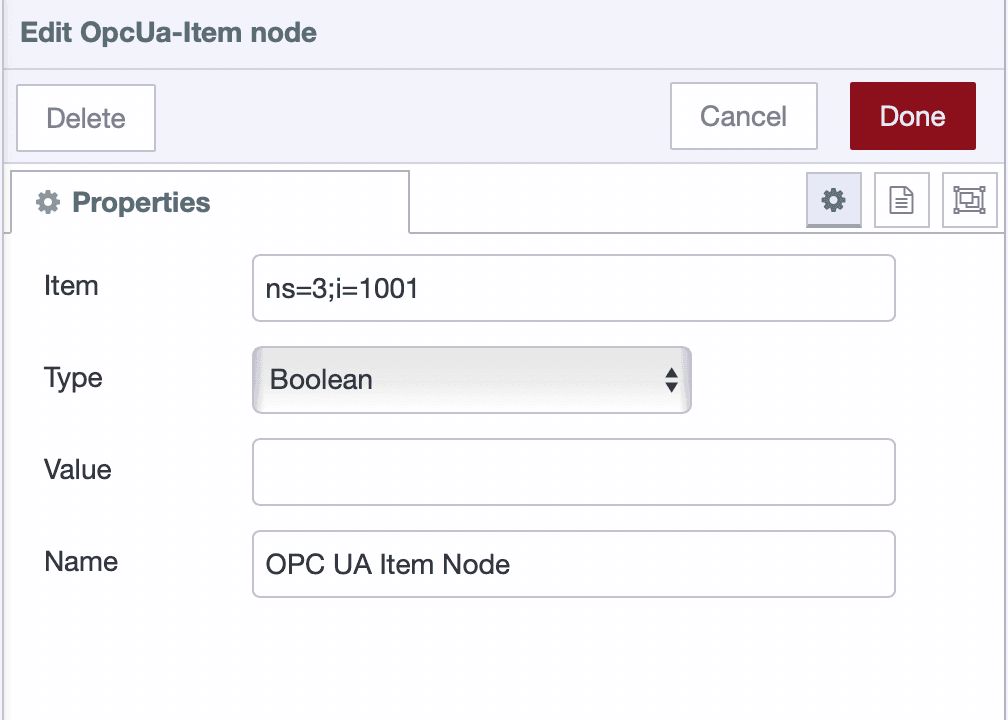
Add an OPC UA Item node and configure:
- Node ID: Enter the tag’s identifier (e.g.,
ns=3;i=1003) - Data Type: Select the appropriate type (e.g.,
Boolean)
- Node ID: Enter the tag’s identifier (e.g.,
-
Connect the output of the Inject node to the input of the Item node.
-
Add an OPC UA Client node and set its Action to
read.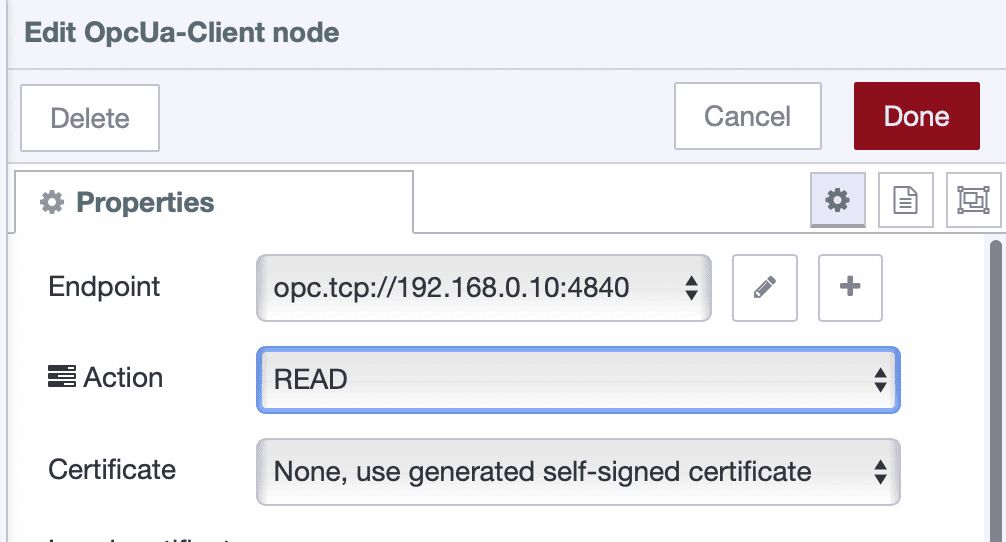
-
Select the endpoint configuration you created earlier.
-
Connect the output of the Item node to the input of the Client node, then connect the Client node's top output to a Debug node.
The OPC UA Client node has three outputs: the top carries the data payload, the middle indicates connection status, and the bottom provides raw responses for debugging.
- Deploy the flow and click the Inject button to trigger the read.
You should see the tag value appear in the debug panel. This confirms that communication is working correctly.
You can also pass the Node ID dynamically using msg.topic from the Inject node if you prefer not to use an Item node.
Reading Multiple Tags
Batch reading improves performance when you need multiple data points from your equipment
- Drag an OPC UA Client node and set its Action to "READ MULTIPLE".
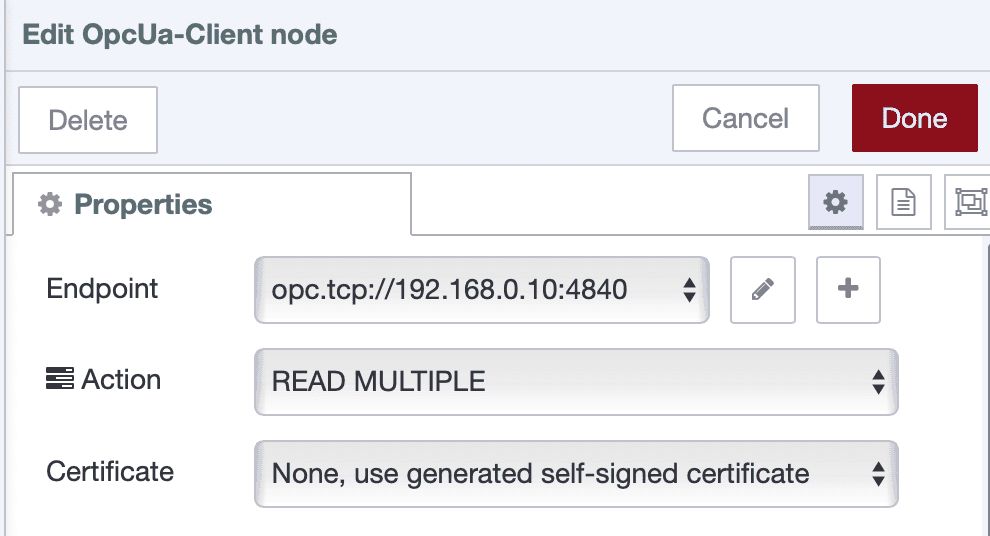
Screenshot showing OPC UA Client node with "READ MULTIPLE" action selected
- Select the endpoint configuration.
- Add an OPC UA Item node for each tag you want to read.
- Add an Inject node for each Item node to trigger it.
- Connect each Inject node to its corresponding Item node.
- Wire all Item nodes into the OPC UA Client node.
- Add a Debug node to the top output of the Client node.
- Deploy the flow.
- Click each Inject node once, the client node will store the tag definitions.
- Send a message with
msg.topic = "readmultiple"to trigger the actual read. - To clear stored items, send
msg.topic = "clearitems".
You now have a flexible setup for reading multiple values from your PLC on demand.
Writing Values
In addition to reading data, OPC UA also allows you to write control signals or parameters to your equipment.
Writing a Single Tag
To write a single value:
-
Drag an Inject node onto the canvas (used to trigger the write operation).
-
Add an OPC UA Item node and configure:
- Node ID: Enter the target identifier.
- Data Type: Choose the appropriate type (e.g.,
Boolean,Double). - Value: Enter the value to write.
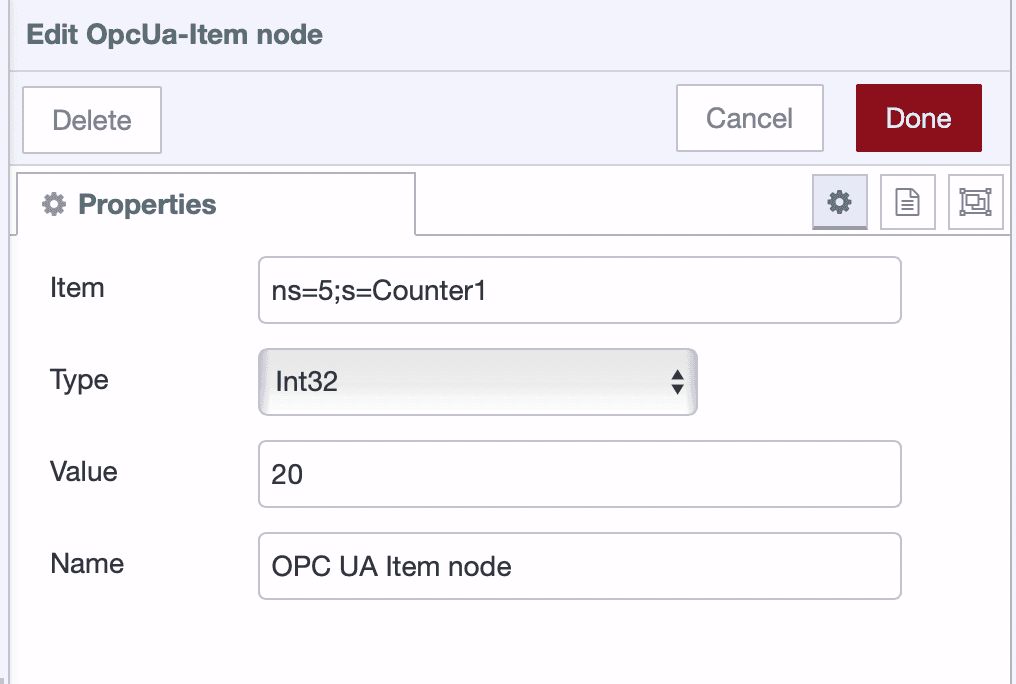
OPC UA Item node configured for a write operation -
Connect the Inject node to the Item node.
-
Add an OPC UA Client node and set its Action to
WRITE.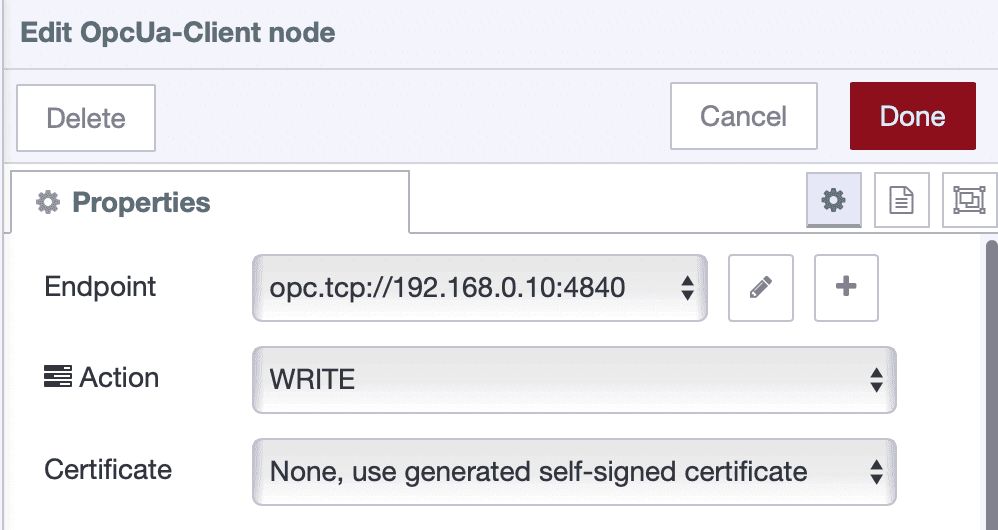
OPC UA Client node with "WRITE" action selected -
Select the endpoint configuration you created earlier.
-
Connect the Item node to the Client node, then connect the Client node's top output to a Debug node.
-
Deploy the flow and click the Inject button to trigger the write.
The OPC UA Client node will confirm the operation with a status like "values written".
Writing Multiple Tags
To write multiple values at once, follow this pattern:
-
Add an OPC UA Client node and set its Action to
WRITE MULTIPLE.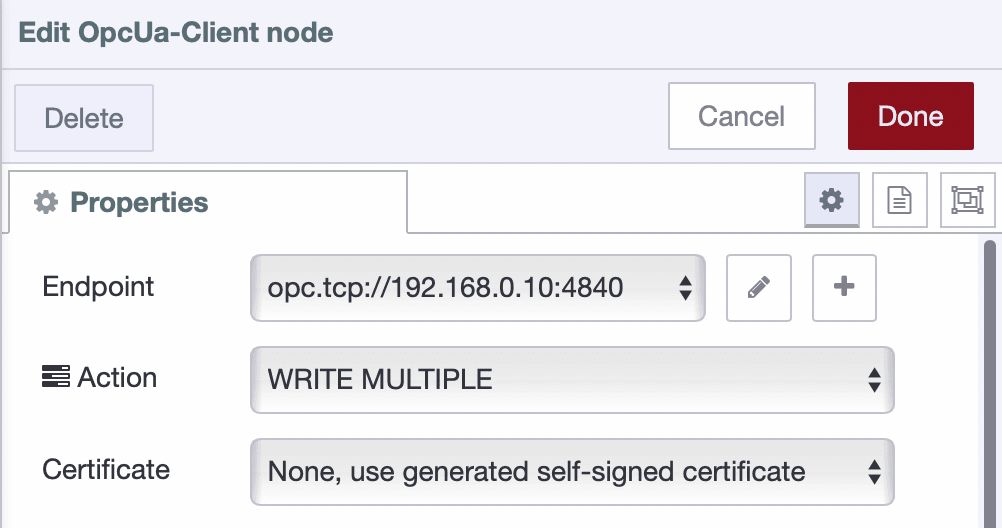
OPC UA Client node configured for writing multiple values -
Select the appropriate endpoint configuration.
-
Add multiple OPC UA Item nodes, each configured with a Node ID, Data Type, and Value to be written.
-
Add an Inject node for each Item node.
-
Connect each Inject node to its corresponding Item node, then connect all Item nodes to the Client node.
-
Add a Debug node to the top output of the Client node.
-
Deploy the flow and trigger all Inject nodes to load the values.
-
To execute the write operation, send a message with
msg.topic = "writemultiple". -
To clear the stored items, send a message with
msg.topic = "clearitems".
This setup allows you to prepare multiple tag values and write them all at once, giving you precise control through a single command.
What’s Next
You’ve now mastered the fundamentals of OPC UA integration—connecting to servers, browsing tags, and reading or writing data. These core building blocks lay the foundation for powerful industrial automation.
In real deployments, you will want more than Inject nodes and debug panels. With FlowFuse Dashboard 2.0, you can build full operator interfaces—live gauges, control buttons, trend charts—fully connected to your OPC UA data.
This guide covered the basics, but OPC UA offers far more. In the next article, we will explore:
- Subscriptions for real-time monitoring without polling
- Events and alarms directly from equipment
- Historical data queries for trend analysis
- Method calls to execute functions on your devices
When it is time to move beyond prototypes, FlowFuse delivers what industrial systems truly need—remote device management, instant rollbacks with full version control, built-in team collaboration, and high availability you can trust.
If you’re ready to simplify your OPC UA integration and scale industrial workflows with Node-RED, start your free trial of FlowFuse today.
Frequently Asked Questions
How do I connect Node-RED to an OPC UA server?
What is the default OPC UA port number?
Can Node-RED connect to a Kepware OPC server?
How do I find an OPC UA Node ID?
What is the difference between OPC UA and MQTT?
Is OPC UA free to use?
Can OPC UA work without internet?
How do I test an OPC UA connection?
What causes the OPC UA BadNodeIdUnknown error?
Can multiple clients connect to one OPC UA server?
About the Author
Sumit Shinde
Technical Writer
Sumit is a Technical Writer at FlowFuse who helps engineers adopt Node-RED for industrial automation projects. He has authored over 100 articles covering industrial protocols (OPC UA, MQTT, Modbus), Unified Namespace architectures, and practical manufacturing solutions. Through his writing, he makes complex industrial concepts accessible, helping teams connect legacy equipment, build real-time dashboards, and implement Industry 4.0 strategies.
Table of Contents
Related Articles:
- OPC UA Tutorial: Advanced Monitoring with Subscriptions, Alarms, and Historical Data
- Node-RED Serial Port Tutorial: Connect RS232/RS485 Manufacturing Equipment
- Agentic AI Reads OPC UA Servers So You Don't Have To
- Why Modbus Refuses to Die
- MQTT vs OPC UA: Why This Question Never Has a Straight Answer